Finding the right golf launch monitors for travel means balancing portability, battery life, setup speed, and the data you actually use. The best models should be easy to pack, quick to deploy at the range or indoors, and dependable enough to guide real practice.
Below, we focus on compact options that fit travel routines without sacrificing the core numbers most golfers care about: ball speed, club speed, carry distance, smash factor, and session tracking.
Best 10 Golf Launch Monitors for Travel Picks for 2026
Portable Home Practice Pick

- Portable launch monitor with up to 10 hours battery life
- Tracks speed, spin, launch angle, and more in Garmin Golf app
- Records swing video and supports virtual rounds with subscription
Best For: Traveling golfers who want app-driven practice and simulator-style features
Simple No-Subscription Choice

- Tracks club speed, ball speed, smash factor, carry, and total distance
- Includes free GPS app with lifetime session history
- IPX3 rain-ready design with USB-C charging
Best For: Travelers who want shot feedback and app tracking with no subscription
Budget Speed Trainer Pick

- Doppler radar monitor for club speed, ball speed, smash factor, and distance
- Works without Wi-Fi, Bluetooth, or an app
- Lightweight 4.9-ounce design runs on AAA batteries
Best For: Travelers focused on compact speed training and basic shot metrics
iPhone Range Replay Pick

- Tracks carry, ball speed, club speed, launch angle, and shot shape
- Records video with shot tracer for swing review
- Lightweight portable design for range, backyard, or indoor use
Best For: iPhone users who want portable launch data with video feedback
Renewed Portable Pick
Garmin Approach R10 for Travel Practice
- Portable launch monitor for home, indoor, and range use
- App tracks speed, spin, launch angle, and swing video
- Up to 10 hours of battery life for longer sessions
Best For: Travel-minded golfers who want app-based analysis and broad practice features
Standalone Radar Choice
GOLFBUDDY Shot Mate Travel-Friendly Monitor

- Doppler radar reads speed, smash factor, and carry distance
- Built-in TFT LCD is easy to view on the range or indoors
- Stores up to 1,000 shots for later review
Best For: Travel golfers who want simple, screen-based swing feedback without app dependence
Portable Speed-Trainer Pick
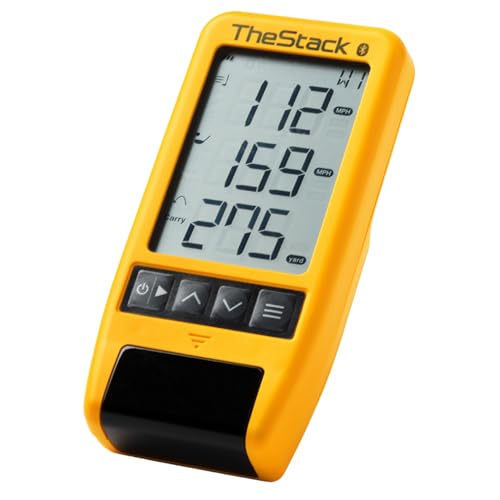
- Measures swing speed and ball speed
- Bluetooth app sync for training data
- Compact and lightweight for travel
Best For: Travelers who want app-guided speed and wedge practice
Battery-Life Value Pick

- Doppler radar with voice and LCD feedback
- Stores shot data and club stats
- Up to 20 hours of battery life
Best For: Travelers who want simple feedback and long runtime
Fast-Setup Radar Pick

- No app or Bluetooth required
- Tracks five essential shot metrics
- Lightweight with a large display
Best For: Travelers who want quick setup and simple core data
Portable Home Practice Pick – Garmin Approach R10
If you want golf launch monitors for travel that still feel feature-rich at the range or in a hotel bay, the Garmin Approach R10 is built around portability and app-based feedback. It tracks key data through the Garmin Golf app, records swing video automatically, and can even support virtual rounds when paired with an active subscription.
Best For: Golfers who want a compact monitor for home practice, driving range sessions, and travel-friendly simulator play.
Pros:
- Portable design with up to 10 hours of battery life
- Tracks club head speed, ball speed, launch angle, launch direction, spin, and more in the app
- Automatically records video clips tied to swing metrics for easier review
- Includes a phone mount for easier app use on the range
Cons:
- Requires a compatible smartphone and the Garmin Golf app for full functionality
- Virtual rounds and some features require an active subscription
- Best suited to golfers comfortable using app-based controls
The R10 stands out as a travel-friendly option for golfers who want more than just basic distance numbers. Its mix of portability, video capture, and broad metric tracking makes it a strong all-around practice companion.
Simple No-Subscription Choice – Shot Scope LM1
For golfers comparing golf launch monitors for travel, the Shot Scope LM1 keeps things straightforward with instant shot feedback and no subscription fees. It measures ball and club speed, smash factor, and carry or total distance, while the included app stores lifetime session history for easy review.
Best For: Golfers who want a travel-ready launch monitor with app support but no recurring fees.
Pros:
- Measures club speed, ball speed, smash factor, carry distance, and total distance
- No subscription fees required for the included GPS app
- IPX3 rain-ready design for indoor or outdoor use
- USB-C charging and 5+ hours of battery life
Cons:
- Battery life is shorter than some competing portable models
- Does not list advanced simulator or video features
- Best for core shot data rather than a full training ecosystem
The LM1 is a practical pick if you want useful numbers without extra costs or complexity. It focuses on fast feedback and portability, which makes it an easy option to pack for range sessions on the go.
Budget Speed Trainer Pick – PRGR HS 130-A
If your goal is a compact, low-fuss option among golf launch monitors for travel, the PRGR HS 130-A focuses on the essentials. It uses Doppler radar to measure club speed, ball speed, smash factor, and carry or total distance, and it does all of that without Wi-Fi, Bluetooth, or an app.
Best For: Golfers who want a lightweight, battery-powered monitor for speed training and basic shot data on the move.
Pros:
- Measures club head speed even without a ball, making it useful for speed training
- No app, Wi-Fi, or Bluetooth required
- Very compact and lightweight at 4.9 ounces
- Runs on AAA batteries and stores 500 past swings in memory
Cons:
- Does not offer connected app features or video analysis
- Focused on core metrics rather than a broader training ecosystem
- Measurement range is listed for 135 to 270 yards
The PRGR is the simplest travel option here, especially if you value portability and speed work over app features. Its lightweight, standalone design makes it easy to toss in a bag and use anywhere.
IPhone Range Replay Pick – Rapsodo MLM
Among golf launch monitors for travel, the Rapsodo Mobile Launch Monitor is built for golfers who want shot-by-shot feedback plus video replay in a lightweight package. It pairs with the free Rapsodo app on iPhone or iPad, giving you carry distance, ball speed, club speed, launch angle, and shot shape wherever you practice.
Best For: iPhone and iPad users who want portable practice feedback with video and shot tracer.
Pros:
- Provides carry distance, ball speed, club speed, launch angle, and shot shape
- Records swing video with on-screen shot tracer for easier analysis
- Lightweight and easy to pack for range, backyard, or indoor net practice
- Free app support on iPhone and iPad, with premium unlocks available
Cons:
- iOS only, so it is not compatible with Android devices
- Premium simulator courses and game modes are additional unlocks
- Less universal if you do not use an iPhone or iPad
The Rapsodo MLM is a strong travel companion if you already live in the Apple ecosystem. Its mix of data, video, and shot tracing makes practice sessions easier to understand on the spot.
Renewed Portable Pick – Garmin Approach R10 for Travel Practice
If you want one of the most flexible golf launch monitors for travel, the Garmin Approach R10 is built for practice at home, indoors, or at the driving range. It pairs with the Garmin Golf app to track core shot data, record swing videos, and even support virtual rounds when you want more than basic range feedback.
Best For: Golfers who want a compact, app-driven launch monitor for travel practice, range sessions, and indoor use.
Pros:
- Tracks club head speed, ball speed, swing tempo, spin, and launch angle with a compatible smartphone
- Automatically records swing video clips when paired with the Garmin Golf app
- Supports training mode with club-by-club stats and dispersion charts
- Up to 10 hours of battery life helps it handle longer practice sessions
Cons:
- Requires the Garmin Golf app and a compatible smartphone for full functionality
- Virtual rounds and leaderboard features need an active subscription
- This is a renewed unit, so condition may vary from new-in-box inventory
The Approach R10 stands out for travelers who want a broad feature set in a portable setup, especially if app-based analysis matters more than a simple standalone screen. It is a practical fit when you need one device for indoor net work, range sessions, and on-the-go feedback.
Standalone Radar Choice – GOLFBUDDY Shot Mate Travel-Friendly Monitor
The GOLFBUDDY Shot Mate is a practical option if you want golf launch monitors for travel without relying on a phone for every basic readout. Its Doppler radar system gives quick feedback on club speed, ball speed, smash factor, and carry distance, and the built-in TFT LCD makes it easy to review data at the range or indoors.
Best For: Golfers who want a compact, self-contained launch monitor with a screen for easy practice feedback on the move.
Pros:
- Doppler radar measures club speed, ball speed, smash factor, and carry distance
- Full-color TFT LCD provides clear visibility in different lighting conditions
- Practice and target modes support structured training sessions
- Saves up to 1,000 shots, with the last 10 swings automatically stored
Cons:
- Battery life is listed at up to 10 hours, but there is no included app-based video analysis
- Ball flight is measured up to 320 yards, so it is more practice-focused than simulation-heavy
- It is compact, but still designed as a dedicated device rather than a tiny pocket unit
For travelers who want fast feedback and a screen they can read without extra setup, the Shot Mate keeps things straightforward. It is especially appealing if you value shot storage and practice structure over deeper app ecosystems.
No-Subscription Bundle – Shot Scope LM1 Portable Travel Monitor
The Shot Scope LM1 is a strong pick for golfers shopping golf launch monitors for travel who want full launch data without monthly fees. It uses Doppler radar to measure club speed, ball speed, smash factor, carry distance, and total distance, while the included portable charger and case make it easier to pack for practice sessions away from home.
Best For: Golfers who want a portable launch monitor bundle with no subscription and useful extras for travel.
Pros:
- No subscription required, with free lifetime app access for session history
- Doppler radar provides club speed, ball speed, smash factor, carry distance, and total distance
- IPX3 rating supports indoor and outdoor use in more variable conditions
- Bundle includes a protective case, cleaning cloth, charging cable, wall adapter, and 5000mAh power bank
Cons:
- Battery life is listed at 5 hours, which is shorter than some travel-focused rivals
- Requires placement five feet behind the ball, so setup space still matters
- Uses app and button controls rather than a larger built-in interface
For frequent travelers, the value here is in the no-fee structure and the included accessories that make packing easier. The LM1 is a practical choice if you want dependable launch data and a bundle that is ready for trips, practice bays, and range work.
Portable Speed-Trainer Pick – TheStack™ Radar
If you want golf launch monitors for travel that are easy to pack and focused on speed work, TheStack™ Radar is built around portability and straightforward feedback. It measures swing speed and ball speed, estimates carry distance and smash factor, and connects to TheStack App for speed training, range sessions, and wedge practice.
Best For: Golfers who want a compact travel-friendly monitor for speed training, range use, and app-guided wedge work.
Pros:
- Measures swing speed, ball speed, estimated carry distance, and smash factor.
- Bluetooth connection to TheStack App for automatic data transfer.
- Includes a free 1-month trial to Stack Wedge Mode.
- Very compact and lightweight for easy packing.
Cons:
- Stack Wedging requires iOS 15.0 or later and is not available on Android.
- Designed more for speed and wedge training than full launch-monitor feature depth.
For travelers who value a small unit and app-connected training over a crowded feature set, this is a practical option. It keeps the focus on measurable speed work and simple feedback that can translate well from the practice area to the course.
Battery-Life Value Pick – Voice Caddie SC200Plus
For golfers comparing golf launch monitors for travel, the Voice Caddie SC200Plus stands out as a simple portable option with real-time shot feedback. It uses Doppler radar technology, adds voice output and an LCD display, and can store shot data and club statistics for later review.
Best For: Golfers who want a portable monitor with straightforward feedback, long battery life, and no app dependency.
Pros:
- Doppler radar technology for shot data tracking.
- Real-time LCD display plus voice output.
- Stores shot data and club statistics.
- Up to 20 hours of battery life for extended practice sessions.
Cons:
- Older model year compared with newer portable monitors.
- Less streamlined for travelers who prefer phone-based app integration.
If you want a travel-ready training device that is quick to use and easy to read, the SC200Plus fits the bill. Its built-in feedback and battery life make it a solid choice for indoor work, the range, or a quick practice stop on the road.
Fast-Setup Radar Pick – BLACK T SHOT5
If you want golf launch monitors for travel that keep setup simple, the BLACK T SHOT5 is built for fast use and easy reading. It measures real carry distance, ball speed, club head speed, smash factor, and total distance, and it works without an app or Bluetooth connection.
Best For: Golfers who want a compact, no-fuss radar monitor they can use quickly indoors, outdoors, or on the road.
Pros:
- Starts up in about 3 seconds with no app setup.
- Tracks the five core data points many golfers use most.
- Large 5-inch display makes shot data easy to see.
- Lightweight design fits easily in a golf bag.
Cons:
- No Bluetooth or app connection for added data management.
- Focused on essential metrics rather than broader training features.
The SHOT5 is a strong travel pick if you want something that is quick to deploy and easy to read between swings. It strips away extras and concentrates on the core numbers that matter most during practice.
How We Picked the Best Golf Launch Monitors for Travel
For Golf Launch Monitors for Travel, priority goes to portability, setup simplicity, and practical shot data over bulky simulator features. We also favor units with solid battery life, reliable indoor/outdoor performance, and app or display experiences that make practice sessions easier on the road.
Because travelers often practice in different locations, we looked for models that can move from hotel room to driving range without much hassle. That means compact footprints, fast pairing, and enough accuracy to support meaningful feedback rather than just casual entertainment.
Quick Comparison: What Matters Most
Not every golfer needs the same tool. Some want a straightforward radar unit with a screen, while others want app-based shot tracking or simulator-style practice. In general, the most travel-friendly monitors trade advanced course integration for convenience and reliability.
- Best for simplicity: units with built-in displays and minimal setup
- Best for indoor practice: compact monitors that work in tighter spaces
- Best for app-driven training: models that sync cleanly with phones or tablets
- Best for battery life: monitors that can handle multiple sessions away from a charger
Key Buying Factors for Golf Launch Monitors for Travel
Size and Packability
If you travel often, a monitor should fit comfortably in a golf bag or carry case. Smaller radar units are usually easier to transport than larger simulator-first systems.
Battery Life and Charging
Long battery life matters when you’re away from home, especially if you practice over several days. Check whether the unit can last through a full range session and whether it charges via common cables or proprietary accessories.
Indoor and Outdoor Use
Many golfers need one device that can handle both the driving range and indoor nets. Confirm launch space requirements, alignment needs, and whether the monitor performs well in limited room environments.
Data Outputs
The most useful numbers are usually ball speed, club speed, carry distance, smash factor, and shot consistency. Some travelers may also want swing speed training features, while others prefer more complete launch data.
Phone and Tablet Compatibility
If you plan to practice on the go, make sure the monitor works with your preferred device. App compatibility can be a major deciding factor for Golf Launch Monitors for Travel, especially if you rely on iPhone or iPad-based setups.
Who Should Buy Which Golf Launch Monitors for Travel?
Choose a simple radar monitor if you want the easiest setup and the least gear to carry. Pick an app-connected model if you want more data and session tracking, especially for indoor practice. If your main goal is swing speed work, a more training-focused unit may be the better fit.
For frequent travelers, the best choice is usually the monitor that you’ll actually bring, set up quickly, and use consistently. That balance of portability and usable feedback is what makes a travel launch monitor worth the investment.