If you want better range sessions, a launch monitor can turn every bucket of balls into usable data. The right unit helps you understand speed, strike quality, carry distance, and what to work on next.
Below, we’ve rounded up 10 of the best golf launch monitors for driving range use in 2026, with options for casual golfers, serious improvers, and players who want simulator-ready features too.
Best 10 Golf Launch Monitors for Driving Range Picks for 2026
Portable Range & Home Trainer

- Tracks swing and ball metrics through the Garmin Golf app.
- Records swing video clips with synced data.
- Up to 10 hours of battery life with included phone mount.
Best For: Golfers who want a portable monitor for range work and app-based analysis.
Simple Session Tracker

- Measures club speed, ball speed, smash factor, and distance.
- Includes practice, on-course, and speed-training modes.
- Free app with lifetime shot history and no subscription fees.
Best For: Players who want straightforward shot data and no ongoing fees.
Premium Data & Sim Golf

- Captures 15 metrics with Doppler radar and dual cameras.
- Includes a 45-day premium trial for simulator features.
- Supports video capture and customizable driving range practice.
Best For: Golfers who want advanced shot data and simulator-style practice.
Color Display Practice Monitor

- Tracks club speed, ball speed, smash factor, and carry distance.
- Full-color TFT LCD display stays readable in varied light.
- Stores up to 1,000 shots with up to 10 hours of battery life.
Best For: Golfers who want a compact monitor with an easy-to-read screen.
Portable Range Feedback
Rapsodo Mobile Launch Monitor Golf Simulator

- Shot-by-shot range feedback with real numbers
- Video replay and shot tracer for swing review
- Portable iPhone/iPad setup for practice anywhere
Best For: Golfers who want a portable iOS launch monitor for range and backyard practice
Budget Speed Training
PRGR HS 130-A Portable Golf Launch Monitor

- Tracks club speed, ball speed, smash factor, and distance
- Works without Wi-Fi, Bluetooth, or apps
- Measures swing speed even without a ball
Best For: Golfers who want an affordable, simple monitor for speed training and range basics
Feature-Packed Simulator Pick
Voice Caddie SC4 PRO Golf GPS Launch Monitor

- 8 data parameters with Prometrics engine accuracy
- 3D Driving Range and E6 Connect included
- Display, voice output, and training modes built in
Best For: Golfers who want a feature-rich monitor with simulator access and detailed practice data
Portable Speed Tracker
TheStack Radar for Range Practice
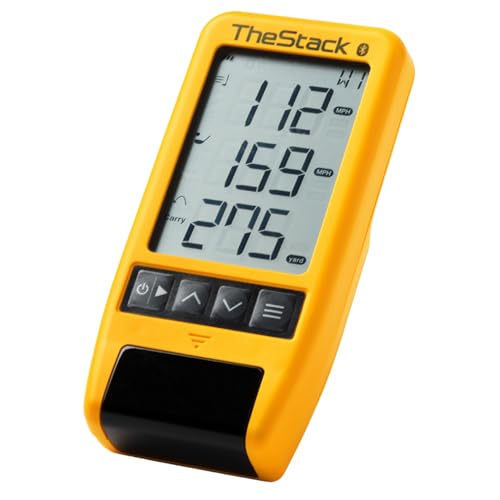
- Measures swing speed, ball speed, carry, and smash factor
- Bluetooth connection to TheStack app with automatic data transfer
- Includes Stack Wedging plus bonus Stack Putting access
Best For: Golfers focused on speed training and wedge practice at the range
Premium Simulator Monitor

- 3-camera system with precision metrics and impact video
- 10-inch touchscreen plus built-in simulator features
- Works indoors or at the driving range with carrying case
Best For: Players wanting a premium monitor with simulator functions and detailed feedback
Simple Range Analyzer
Voice Caddie SC200Plus for Range

- Doppler radar with real-time shot data and voice output
- Adjustable loft angles for varied club conditions
- Stores shot and club stats for easy review
Best For: Golfers wanting simple, portable feedback at the range
Portable Range & Home Trainer – Garmin Approach R10
If you want one of the most flexible golf launch monitors for driving range sessions, the Garmin Approach R10 is built to follow you from home practice to the range. It pairs with the Garmin Golf app to show key swing and ball data, record video clips, and help you review patterns over time.
Best For: Golfers who want a portable monitor for range work, home practice, and app-based game tracking.
Pros:
- Tracks club head speed, ball speed, swing tempo, spin, launch angle, and more when paired with the Garmin Golf app.
- Records swing video clips with the corresponding metrics for easier analysis.
- Includes training mode with shot dispersion charts and estimated ball flight data.
- Offers up to 10 hours of battery life and comes with a phone mount for easier app use.
Cons:
- Requires a compatible smartphone and the Garmin Golf app for full feature access.
- Advanced course play and tournaments require an active subscription.
This is a strong pick if you want portable, app-connected feedback rather than a simple standalone display. It fits golfers who value practice detail, video review, and long battery life during range sessions.
Simple Session Tracker – Shot Scope LM1
The Shot Scope LM1 is a practical choice among golf launch monitors for driving range practice if you want fast feedback without a subscription. It measures core shot data, supports range and speed-training sessions, and pairs with a free app that stores your shot history.
Best For: Players who want straightforward ball and club speed data with no subscription fees.
Pros:
- Measures club speed, ball speed, smash factor, carry distance, and total distance.
- Includes Practice Range, On-Course, and Speed Training session types.
- Free Golf GPS app with lifetime shot history and no subscription fees.
- IPX3 weather-resistant design and 5+ hour battery life with USB-C charging.
Cons:
- Battery life is shorter than some competitors at just over 5 hours.
- Weather resistance is limited to IPX3 rather than full waterproofing.
For golfers who mainly want reliable practice numbers and an easy app workflow, the LM1 keeps things simple. It is especially appealing if you want to store sessions and review trends without paying ongoing fees.
Premium Data & Sim Golf – Rapsodo MLM2PRO
The Rapsodo MLM2PRO stands out in golf launch monitors for driving range use if you want deeper data and simulator features in one unit. Its Doppler radar and dual-camera setup capture a wide set of metrics, while the included premium trial unlocks simulator courses and extra training tools.
Best For: Golfers who want advanced shot data, swing video, and simulator-style practice features.
Pros:
- Captures 15 key metrics including spin rate, spin axis, carry distance, club speed, club path, and launch angle.
- Doppler radar and dual camera setup provide shot tracking and swing capture from multiple angles.
- Includes a 45-day premium trial with simulated courses, target range, and speed training tools.
- Premium access includes 30,000+ home golf simulator courses and customizable driving range practice.
Cons:
- Many of the top simulator features depend on the premium membership after the trial.
- Requires a smartphone and app-based setup for full use.
If your practice sessions need more than basic distance numbers, the MLM2PRO offers a more advanced training setup. It is a good fit for golfers who want detailed feedback and simulator-style variety at home or on the range.
Color Display Practice Monitor – GOLFBUDDY Shot Mate
For golfers looking at golf launch monitors for driving range sessions, the GOLFBUDDY Shot Mate focuses on clear feedback and easy portability. Its Doppler radar measures the essentials, while the full-color TFT LCD display makes it simple to review shots in bright or changing conditions.
Best For: Golfers who want a compact practice monitor with an easy-to-read screen and long battery life.
Pros:
- Doppler radar tracks club speed, ball speed, smash factor, and carry distance.
- Full-color TFT LCD display is designed for visibility in all lighting conditions.
- Practice and target modes help structure range sessions.
- Stores up to 1,000 shots and offers up to 10 hours of battery life.
Cons:
- Does not list app connectivity or advanced simulator-style features.
- Shot storage is useful, but there is no mention of subscription-based course play or video analysis.
The Shot Mate is a straightforward range tool for players who want fast numbers and a visible display without extra complexity. It makes sense if you value portability, long runtime, and simple practice structure.
Portable Range Feedback – Rapsodo Mobile Launch Monitor Golf Simulator
If you want golf launch monitors for driving range sessions that turn practice into usable data, the Rapsodo MLM is built for fast feedback. It gives shot-by-shot numbers on ball speed, club speed, launch angle, carry distance, and shot shape, plus video replay with shot tracer so you can see exactly what happened on each swing.
Best For: Golfers who want a portable iPhone/iPad launch monitor for range work, backyard practice, and swing review.
Pros:
- Tracks key practice data like ball speed, club speed, launch angle, carry distance, and shot shape.
- Video replay with shot tracer makes it easier to diagnose misses and confirm ball flight.
- Portable design works at the driving range, in the backyard, or into an indoor net.
- Pairs with the free Rapsodo app on iPhone and iPad for added simulator and game modes.
Cons:
- iOS only, so Android users will need a different option.
- Premium features like simulator courses and game modes require an unlock.
For players who value real numbers and swing video over basic distance estimates, this is a strong practice tool. It is especially appealing if you already use an iPhone or iPad and want a compact setup you can bring to the range.
Budget Speed Training – PRGR HS 130-A Portable Golf Launch Monitor
Among golf launch monitors for driving range use, the PRGR HS 130-A stands out for simple, affordable speed and distance tracking. Its Doppler radar measures club head speed, ball speed, smash factor, total distance, and carry distance, and it does all of that without needing Wi-Fi, Bluetooth, or an app.
Best For: Golfers who want a low-cost, no-frills launch monitor for speed training and basic range data.
Pros:
- Measures club head speed even without a ball, which is useful for speed training.
- Tracks ball speed, smash factor, total distance, and carry distance with Doppler radar.
- No app, Wi-Fi, or Bluetooth required, so setup stays simple.
- Runs on AAA batteries and stores 500 past swings in memory.
Cons:
- Focuses on core data rather than advanced simulator-style features.
- Does not include wireless app connectivity or a display-heavy experience.
If you mainly want a straightforward way to measure speed and distance, this PRGR is easy to live with. It is a practical choice for golfers who care more about repeatable training data than extra software features.
Feature-Packed Simulator Pick – Voice Caddie SC4 PRO Golf GPS Launch Monitor
If you are shopping golf launch monitors for driving range practice and want more than basic numbers, the Voice Caddie SC4 PRO brings a lot to the table. It uses the Prometrics engine for ball and club data, includes 8 data parameters, and adds 3D Driving Range and E6 Connect access for a more immersive practice session indoors or outdoors.
Best For: Golfers who want a higher-end launch monitor with simulator features, voice output, and detailed practice data.
Pros:
- Prometrics engine delivers real-time ball and club head data for indoor or outdoor use.
- Includes 3D Driving Range and E6 Connect access for simulator-style practice.
- 5.3-inch display plus voice output make it easier to read and hear information during sessions.
- Multiple modes support practice, target work, and swing speed training.
Cons:
- More complex than a basic launch monitor if you only want simple range numbers.
- Best value depends on whether you will use the included simulator and app features.
This is the most feature-rich option in the group and makes sense if you want driving-range feedback that also supports simulator-style practice. It is a strong pick for golfers who like having data, visuals, and training modes in one package.
Portable Speed Tracker – TheStack Radar for Range Practice
If you want a compact option for golf launch monitors for driving range use, the TheStack™ Radar focuses on the essentials: swing speed, ball speed, estimated carry distance, and smash factor. It pairs with the TheStack app over Bluetooth, so you can track speed work and wedge sessions without a bulky setup.
Best For: Golfers who want a portable launch monitor for speed training, range reps, and wedge-distance practice.
Pros:
- Measures swing speed and ball speed with estimated carry distance and smash factor
- Connects directly to TheStack App for automatic data transfer
- Includes Stack Wedging practice sessions and a 1-month free trial
- Bonus Stack Putting access adds guided putting practice on iOS
Cons:
- Stack Wedging is iOS only and requires iOS 15.0 or later
- Wedging is not yet available on Android
- Best suited to training data, not a full simulator experience
TheStack Radar is a practical choice if your priority is speed development and structured wedge work on the range. It is compact, app-connected, and built around training feedback rather than a feature-heavy simulator package.
Premium Simulator Monitor – Garmin Approach R50 for Range
Among golf launch monitors for driving range sessions, the Garmin Approach R50 stands out as a premium all-in-one unit with a 3-camera system, a 10-inch touchscreen, and simulator features built in. It is designed for players who want detailed shot data, impact video, and the ability to practice or play virtual rounds from the range or indoors.
Best For: Golfers who want a premium launch monitor with simulator features, video feedback, and a built-in display.
Pros:
- 3-camera system delivers precision metrics and advanced measurements
- 10-inch touchscreen shows insights, impact videos, and training data on the device
- Works indoors or on the driving range and includes a carrying case
- Supports virtual rounds on more than 43,000 courses with a Garmin Golf membership
Cons:
- Virtual rounds and some features require a subscription or active membership
- Heavier and larger than simple portable launch monitors
- Premium feature set will be more than some range-only golfers need
The Approach R50 is built for golfers who want more than basic shot numbers. If you want a launch monitor that can travel to the range yet still deliver a true simulator-style experience, this is the most feature-rich option in the group.
Simple Range Analyzer – Voice Caddie SC200Plus for Range
If you need a straightforward option for golf launch monitors for driving range practice, the Voice Caddie SC200Plus keeps things simple with real-time shot data, Doppler radar, and voice output. It is built for golfers who want an easy-to-use swing analyzer for indoor or outdoor sessions without a complicated setup.
Best For: Golfers who want a simple portable monitor for swing feedback, distance tracking, and practice on a budget.
Pros:
- Doppler radar technology provides reliable shot data collection
- Instant feedback on the LCD display with voice output
- Adjustable loft angles help simulate different club conditions
- Stores shot data and club statistics for later review
Cons:
- Does not offer the advanced simulator-style visuals of premium units
- More focused on swing analysis than full launch monitor metrics
- Older model year compared with newer premium options
The SC200Plus is a practical pick for golfers who want quick feedback and easy data storage at the range. It is especially appealing if you value simplicity, portability, and long battery life over high-end simulator features.
How We Picked the Best Golf Launch Monitors for Driving Range
We focused on Golf Launch Monitors for Driving Range practice that balance accuracy, portability, and ease of use. Priority went to models that provide reliable ball and club data, work well outdoors, and offer a setup that won’t slow down a practice session.
We also considered battery life, display quality, app compatibility, shot metrics, and whether each unit is practical for everyday range work rather than only indoor simulation.
Quick Comparison
For simple feedback, compact radar units and swing analyzers are the easiest to carry and fastest to set up. If you want deeper numbers and simulator features, mobile-connected models and premium all-in-one units are better suited to golfers who practice often and want more complete data.
Key Buying Factors for Golf Launch Monitors for Driving Range
Data You Actually Need
At minimum, look for ball speed, carry distance, and club speed. More advanced players may want smash factor, launch angle, spin, and shot dispersion for better gap testing and club-fitting insight.
Portability and Setup
A good driving-range monitor should be easy to carry, quick to align, and stable on uneven turf. Radar-based models often need a bit more space behind the ball, while camera-based or phone-linked systems may need more setup time but offer richer visuals.
Display and App Experience
Some golfers prefer a built-in screen for instant feedback, while others are happy to use a smartphone or tablet. Choose the format that matches how you already practice so the device feels helpful instead of distracting.
Range Versus Simulator Use
If you only want practice feedback, a simpler monitor may be enough. If you also want indoor simulation or structured drills, choose one of the Golf Launch Monitors for Driving Range use that supports virtual courses, app integration, or exportable shot data.
Who Should Buy Which Golf Launch Monitors for Driving Range?
Beginners and casual golfers usually do best with straightforward, affordable units that emphasize speed, distance, and swing feedback. Mid-handicap players often benefit from devices with better shot detail and app tracking. More advanced golfers, instructors, and data-driven players should look for premium systems with broader metrics, stronger software, and simulator compatibility.
If you practice primarily at the range, prioritize accuracy, portability, and quick feedback over extra features you may never use. The best choice is the one you’ll actually bring to every session.